如何發送Flex Message
Overview
FlexMessage是可以自由設計外觀的訊息格式,且使用此格式發送的訊息,在PC和手機上都可以檢視。
你可以輕易設計出類似底下這樣格式自由的訊息:
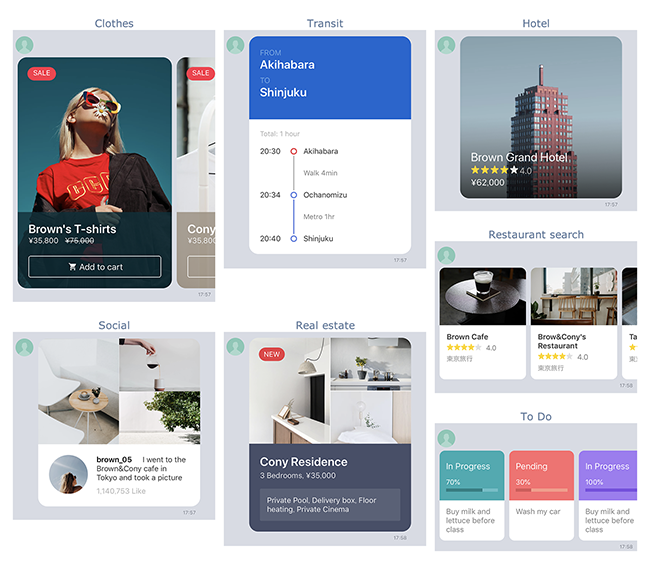
設計、行銷人員即便不懂JSON,也可以透過底下這個Simulator來建立Flex Message: https://developers.line.biz/flex-simulator/
本Lab介紹如何透過 C# 以程式碼發送建立好的Flex Message格式的訊息JSON。
Prerequisites
- 建立好LINE Bot帳號,並取得Channel Access Token與UserId 參考這裡
- 下載安裝 .net core sdk 3.1 以上版本 here
- 安裝 Visual Studio Code 開發工具 here
- 建立 .net core console 專案,在專案中引用 nuget 上的 LineBotSDK 套件。
- 透過Simulator建立好一組訊息JSON
Steps
建立 .net core console專案
在命令列模式建立資料夾,接著透過 dotnet new 指令建立專案
PS D:\> md linetest
PS D:\> cd linetest
PS D:\linetest> dotnet new console
The template "Console Application" was created successfully.

Processing post-creation actions...
Running 'dotnet restore' on D:\linetest\linetest.csproj...
  正在判斷要還原的專案...
  已還原 D:\linetest\linetest.csproj (251 ms 內)。
Restore succeeded.
接著執行底下指令, 安裝 LineBotSDK 套件...
PS D:\linetest> dotnet add package linebotsdk
PS D:\linetest> dotnet add package linebotsdk
  正在判斷要還原的專案...
  Writing C:\Users\...\AppData\Local\Temp\tmpC537.tmp
info : 正在將套件 'linebotsdk' 的 PackageReference 新增至專案 'D:\linetest\linetest.csproj'。
info : 正在還原 D:\linetest\linetest.csproj 的封裝...
info :   GET https://api.nuget.org/v3-flatcontainer/linebotsdk/index.json
info :   OK https://api.nuget.org/v3-flatcontainer/linebotsdk/index.json 1088 毫秒
info : 套件 'linebotsdk' 與專案 'D:\linetest\linetest.csproj' 中的所有架構相容。
info : 已將套件 'linebotsdk' 版本 '2.2.23' 的 PackageReference 新增至檔案 'D:\linetest\linetest.csproj'。
info : 正在認可還原...
info : 正在將資產檔案寫入磁碟。路徑: D:\linetest\obj\project.assets.json
log  : 已還原 D:\linetest\linetest.csproj (3.16 sec 內)。
PS D:\linetest> dotnet build
Microsoft (R) Build Engine for .NET Core 16.6.0+5ff7b0c9e 版
Copyright (C) Microsoft Corporation. 著作權所有,並保留一切權利。

  正在判斷要還原的專案...
  已還原 D:\linetest\linetest.csproj (712 ms 內)。
  linetest -> D:\linetest\bin\Debug\netcoreapp3.1\linetest.dll

建置成功。
    0 個警告
    0 個錯誤

經過時間 00:00:05.39
透過底下指令,開啟 VS Code進入開發環境
請在命令列輸入 code (空格) .
PS D:\linetest> code .
PS D:\linetest>
 完成後會看到類似上面的畫面。
建立bot物件實體
輸入底下程式碼,建立bot instance (請將token與UserId換為你自己的)
var  ChannelAccessToken = "___token___"; //Channel Access Token
var  UserId = "___UserId__"; //收訊者
var  bot = new  isRock.LineBot.Bot(ChannelAccessToken);
撰寫程式碼發送Flex Message
繼續在程式碼中加入底下內容:
            var flexContents = @"
___換成訊息JSON___
        ";
            //定義一則訊息
            var Messages = @"
                [
                {
                ""type"": ""flex"",
                ""altText"": ""This is a Flex Message"",
                ""contents"": $flex$
                }
                ]
            ";

            //替換Flex Contents
            var MessageJSON = Messages.Replace("$flex$", flexContents);
            //發送訊息
            bot.PushMessageWithJSON(UserId, MessageJSON);
發送Simulator做出的訊息
請從Simulator取得要發送的訊息主體:

取得的JSON類似底下這樣的格式:
{
  "type": "bubble",
  "hero": {
    "type": "image",
    "url": "https://scdn.line-apps.com/n/channel_devcenter/img/fx/01_1_cafe.png",
    "size": "full",
    "aspectRatio": "20:13",
    "aspectMode": "cover",
    "action": {
      "type": "uri",
      "uri": "http://linecorp.com/"
    }
  },
  "body": {
    "type": "box",
    "layout": "vertical",
    "contents": [
      {
        "type": "text",
        "text": "Brown Cafe",
        "weight": "bold",
        "size": "xl"
      },
      {
        "type": "box",
        "layout": "baseline",
        "margin": "md",
        "contents": [
          {
            "type": "icon",
            "size": "sm",
            "url": "https://scdn.line-apps.com/n/channel_devcenter/img/fx/review_gold_star_28.png"
          },
          {
            "type": "icon",
            "size": "sm",
            "url": "https://scdn.line-apps.com/n/channel_devcenter/img/fx/review_gold_star_28.png"
          },
          {
            "type": "icon",
            "size": "sm",
            "url": "https://scdn.line-apps.com/n/channel_devcenter/img/fx/review_gold_star_28.png"
          },
          {
            "type": "icon",
            "size": "sm",
            "url": "https://scdn.line-apps.com/n/channel_devcenter/img/fx/review_gold_star_28.png"
          },
          {
            "type": "icon",
            "size": "sm",
            "url": "https://scdn.line-apps.com/n/channel_devcenter/img/fx/review_gray_star_28.png"
          },
          {
            "type": "text",
            "text": "4.0",
            "size": "sm",
            "color": "#999999",
            "margin": "md",
            "flex": 0
          }
        ]
      },
      {
        "type": "box",
        "layout": "vertical",
        "margin": "lg",
        "spacing": "sm",
        "contents": [
          {
            "type": "box",
            "layout": "baseline",
            "spacing": "sm",
            "contents": [
              {
                "type": "text",
                "text": "Place",
                "color": "#aaaaaa",
                "size": "sm",
                "flex": 1
              },
              {
                "type": "text",
                "text": "Miraina Tower, 4-1-6 Shinjuku, Tokyo",
                "wrap": true,
                "color": "#666666",
                "size": "sm",
                "flex": 5
              }
            ]
          },
          {
            "type": "box",
            "layout": "baseline",
            "spacing": "sm",
            "contents": [
              {
                "type": "text",
                "text": "Time",
                "color": "#aaaaaa",
                "size": "sm",
                "flex": 1
              },
              {
                "type": "text",
                "text": "10:00 - 23:00",
                "wrap": true,
                "color": "#666666",
                "size": "sm",
                "flex": 5
              }
            ]
          }
        ]
      }
    ]
  },
  "footer": {
    "type": "box",
    "layout": "vertical",
    "spacing": "sm",
    "contents": [
      {
        "type": "button",
        "style": "link",
        "height": "sm",
        "action": {
          "type": "uri",
          "label": "CALL",
          "uri": "https://linecorp.com"
        }
      },
      {
        "type": "button",
        "style": "link",
        "height": "sm",
        "action": {
          "type": "uri",
          "label": "WEBSITE",
          "uri": "https://linecorp.com"
        }
      },
      {
        "type": "spacer",
        "size": "sm"
      }
    ],
    "flex": 0
  }
}
為了讓C#可以使用,請將"換成"":
{
  ""type"": ""bubble"",
  ""hero"": {
    ""type"": ""image"",
    ""url"": ""https://scdn.line-apps.com/n/channel_devcenter/img/fx/01_1_cafe.png"",
    ""size"": ""full"",
    ""aspectRatio"": ""20:13"",
    ""aspectMode"": ""cover"",
    ""action"": {
      ""type"": ""uri"",
      ""uri"": ""http://linecorp.com/""
    }
  },
  ""body"": {
    ""type"": ""box"",
    ""layout"": ""vertical"",
    ""contents"": [
      {
        ""type"": ""text"",
        ""text"": ""Brown Cafe"",
        ""weight"": ""bold"",
        ""size"": ""xl""
      },
      {
        ""type"": ""box"",
        ""layout"": ""baseline"",
        ""margin"": ""md"",
        ""contents"": [
          {
            ""type"": ""icon"",
            ""size"": ""sm"",
            ""url"": ""https://scdn.line-apps.com/n/channel_devcenter/img/fx/review_gold_star_28.png""
          },
          {
            ""type"": ""icon"",
            ""size"": ""sm"",
            ""url"": ""https://scdn.line-apps.com/n/channel_devcenter/img/fx/review_gold_star_28.png""
          },
          {
            ""type"": ""icon"",
            ""size"": ""sm"",
            ""url"": ""https://scdn.line-apps.com/n/channel_devcenter/img/fx/review_gold_star_28.png""
          },
          {
            ""type"": ""icon"",
            ""size"": ""sm"",
            ""url"": ""https://scdn.line-apps.com/n/channel_devcenter/img/fx/review_gold_star_28.png""
          },
          {
            ""type"": ""icon"",
            ""size"": ""sm"",
            ""url"": ""https://scdn.line-apps.com/n/channel_devcenter/img/fx/review_gray_star_28.png""
          },
          {
            ""type"": ""text"",
            ""text"": ""4.0"",
            ""size"": ""sm"",
            ""color"": ""#999999"",
            ""margin"": ""md"",
            ""flex"": 0
          }
        ]
      },
      {
        ""type"": ""box"",
        ""layout"": ""vertical"",
        ""margin"": ""lg"",
        ""spacing"": ""sm"",
        ""contents"": [
          {
            ""type"": ""box"",
            ""layout"": ""baseline"",
            ""spacing"": ""sm"",
            ""contents"": [
              {
                ""type"": ""text"",
                ""text"": ""Place"",
                ""color"": ""#aaaaaa"",
                ""size"": ""sm"",
                ""flex"": 1
              },
              {
                ""type"": ""text"",
                ""text"": ""Miraina Tower, 4-1-6 Shinjuku, Tokyo"",
                ""wrap"": true,
                ""color"": ""#666666"",
                ""size"": ""sm"",
                ""flex"": 5
              }
            ]
          },
          {
            ""type"": ""box"",
            ""layout"": ""baseline"",
            ""spacing"": ""sm"",
            ""contents"": [
              {
                ""type"": ""text"",
                ""text"": ""Time"",
                ""color"": ""#aaaaaa"",
                ""size"": ""sm"",
                ""flex"": 1
              },
              {
                ""type"": ""text"",
                ""text"": ""10:00 - 23:00"",
                ""wrap"": true,
                ""color"": ""#666666"",
                ""size"": ""sm"",
                ""flex"": 5
              }
            ]
          }
        ]
      }
    ]
  },
  ""footer"": {
    ""type"": ""box"",
    ""layout"": ""vertical"",
    ""spacing"": ""sm"",
    ""contents"": [
      {
        ""type"": ""button"",
        ""style"": ""link"",
        ""height"": ""sm"",
        ""action"": {
          ""type"": ""uri"",
          ""label"": ""CALL"",
          ""uri"": ""https://linecorp.com""
        }
      },
      {
        ""type"": ""button"",
        ""style"": ""link"",
        ""height"": ""sm"",
        ""action"": {
          ""type"": ""uri"",
          ""label"": ""WEBSITE"",
          ""uri"": ""https://linecorp.com""
        }
      },
      {
        ""type"": ""spacer"",
        ""size"": ""sm""
      }
    ],
    ""flex"": 0
  }
}
然後,將Program.cs主程式中的『換成訊息JSON』置換為上面的JSON,完成後如下:
            var flexContents = @"
{
  ""type"": ""bubble"",
  ""hero"": {
    ""type"": ""image"",
    ""url"": ""https://scdn.line-apps.com/n/channel_devcenter/img/fx/01_1_cafe.png"",
    ""size"": ""full"",
    ""aspectRatio"": ""20:13"",
    ""aspectMode"": ""cover"",
    ""action"": {
      ""type"": ""uri"",
      ""uri"": ""http://linecorp.com/""
    }
  },
  ""body"": {
    ""type"": ""box"",
    ""layout"": ""vertical"",
    ""contents"": [
      {
        ""type"": ""text"",
        ""text"": ""Brown Cafe"",
        ""weight"": ""bold"",
        ""size"": ""xl""
      },
      {
        ""type"": ""box"",
        ""layout"": ""baseline"",
        ""margin"": ""md"",
        ""contents"": [
          {
            ""type"": ""icon"",
            ""size"": ""sm"",
            ""url"": ""https://scdn.line-apps.com/n/channel_devcenter/img/fx/review_gold_star_28.png""
          },
          {
            ""type"": ""icon"",
            ""size"": ""sm"",
            ""url"": ""https://scdn.line-apps.com/n/channel_devcenter/img/fx/review_gold_star_28.png""
          },
          {
            ""type"": ""icon"",
            ""size"": ""sm"",
            ""url"": ""https://scdn.line-apps.com/n/channel_devcenter/img/fx/review_gold_star_28.png""
          },
          {
            ""type"": ""icon"",
            ""size"": ""sm"",
            ""url"": ""https://scdn.line-apps.com/n/channel_devcenter/img/fx/review_gold_star_28.png""
          },
          {
            ""type"": ""icon"",
            ""size"": ""sm"",
            ""url"": ""https://scdn.line-apps.com/n/channel_devcenter/img/fx/review_gray_star_28.png""
          },
          {
            ""type"": ""text"",
            ""text"": ""4.0"",
            ""size"": ""sm"",
            ""color"": ""#999999"",
            ""margin"": ""md"",
            ""flex"": 0
          }
        ]
      },
      {
        ""type"": ""box"",
        ""layout"": ""vertical"",
        ""margin"": ""lg"",
        ""spacing"": ""sm"",
        ""contents"": [
          {
            ""type"": ""box"",
            ""layout"": ""baseline"",
            ""spacing"": ""sm"",
            ""contents"": [
              {
                ""type"": ""text"",
                ""text"": ""Place"",
                ""color"": ""#aaaaaa"",
                ""size"": ""sm"",
                ""flex"": 1
              },
              {
                ""type"": ""text"",
                ""text"": ""Miraina Tower, 4-1-6 Shinjuku, Tokyo"",
                ""wrap"": true,
                ""color"": ""#666666"",
                ""size"": ""sm"",
                ""flex"": 5
              }
            ]
          },
          {
            ""type"": ""box"",
            ""layout"": ""baseline"",
            ""spacing"": ""sm"",
            ""contents"": [
              {
                ""type"": ""text"",
                ""text"": ""Time"",
                ""color"": ""#aaaaaa"",
                ""size"": ""sm"",
                ""flex"": 1
              },
              {
                ""type"": ""text"",
                ""text"": ""10:00 - 23:00"",
                ""wrap"": true,
                ""color"": ""#666666"",
                ""size"": ""sm"",
                ""flex"": 5
              }
            ]
          }
        ]
      }
    ]
  },
  ""footer"": {
    ""type"": ""box"",
    ""layout"": ""vertical"",
    ""spacing"": ""sm"",
    ""contents"": [
      {
        ""type"": ""button"",
        ""style"": ""link"",
        ""height"": ""sm"",
        ""action"": {
          ""type"": ""uri"",
          ""label"": ""CALL"",
          ""uri"": ""https://linecorp.com""
        }
      },
      {
        ""type"": ""button"",
        ""style"": ""link"",
        ""height"": ""sm"",
        ""action"": {
          ""type"": ""uri"",
          ""label"": ""WEBSITE"",
          ""uri"": ""https://linecorp.com""
        }
      },
      {
        ""type"": ""spacer"",
        ""size"": ""sm""
      }
    ],
    ""flex"": 0
  }
}
        ";
            //定義一則訊息
            var Messages = @"
                [
                {
                ""type"": ""flex"",
                ""altText"": ""This is a Flex Message"",
                ""contents"": $flex$
                }
                ]
            ";

            //替換Flex Contents
            var MessageJSON = Messages.Replace("$flex$", flexContents);
            //發送訊息
            bot.PushMessageWithJSON(UserId, MessageJSON);
在terminal模式中,鍵入 dotnet run 執行程式
PS D:\linetest> dotnet run

相關參考資料
電子書:https://www.pubu.com.tw/ebook/103305
實體書:https://www.tenlong.com.tw/products/9789865022662
線上課程:https://www.udemy.com/line-bot/
LineBotSDK:https://www.nuget.org/packages/LineBotSDK
如果需要即時取得更多相關訊息,可按這裡加入FB專頁。若這篇文章對您有所幫助,請幫我們分享出去,謝謝您的支持。